
Ugur
Gokus
Home
Think Notes
Designing a trust-first AI meeting notes experience under real-world constraints

Project Overview
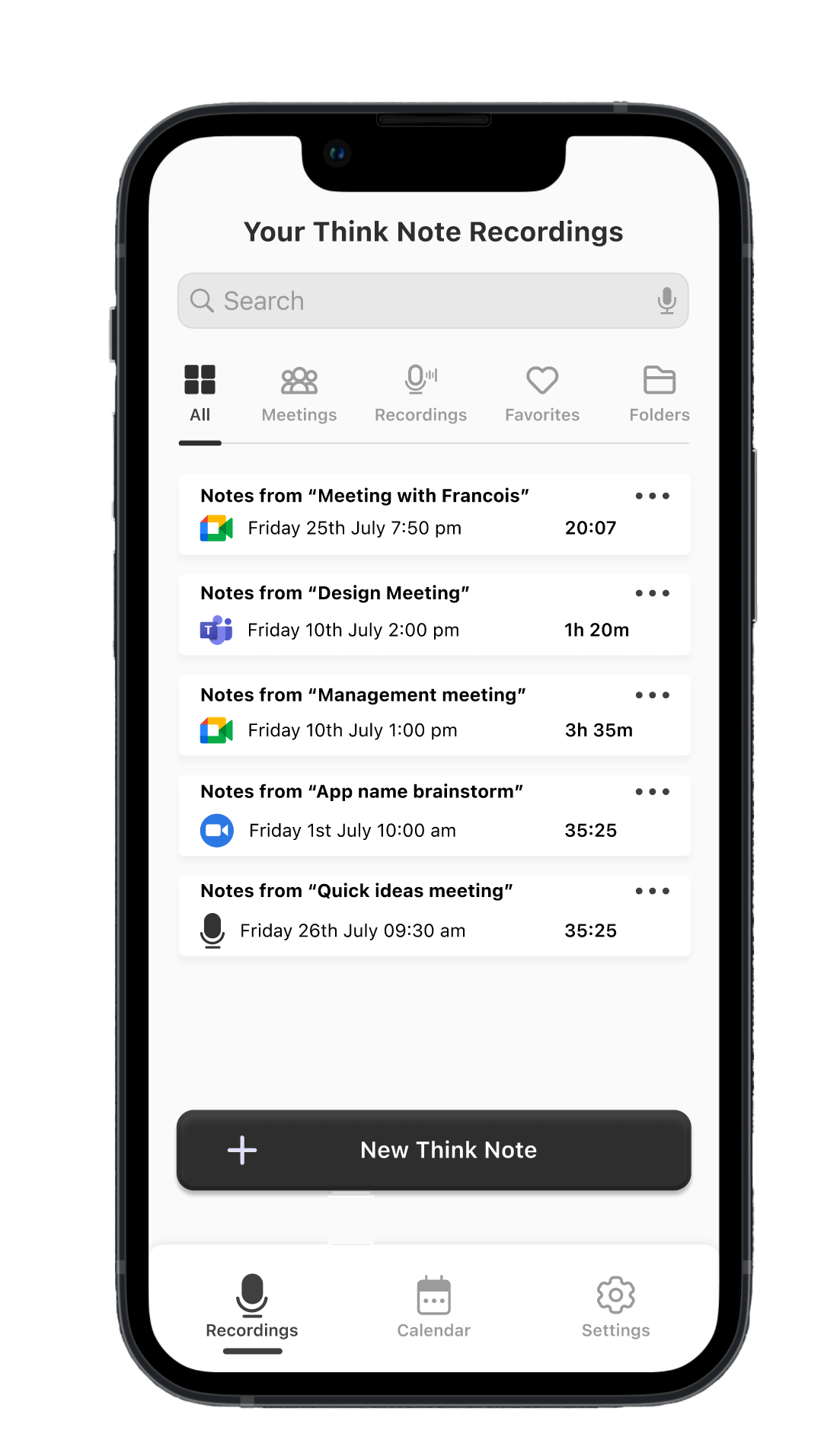
Think Notes is an AI-powered meeting notes application designed to help users capture conversations and automatically generate structured summaries, action items, and shareable outputs after meetings.
Rather than focusing on real-time transcription or complex dashboards, the product prioritises clarity, control, and post-meeting usefulness, allowing users to focus on the conversation itself while AI works quietly in the background.
Platform & Project type (2025)
- Mobile-first (iOS & Android)
- MVP / speed to market product
My Role
- Designed the core user flows and mobile interfaces
- Competitor Analysis
- Defined interaction patterns for AI-generated summaries and action items
- Designed the Think Notes app logo and visual identity
⏰ Duration : 4 Months

Context & Constraints
Think Notes was developed with a strong speed-to-market goal.Due to limited budget and a tight delivery timeline, the project did not include primary user research (such as interviews or usability testing) during the initial phase.
As the UI/UX designer, I took ownership of the research phase by conducting an independent competitive analysis. I reviewed and analysed several existing AI-powered meeting and note-taking tools, focusing on how they approached:
- Meeting recording flows
- AI-generated summaries
- Action items and task ownership
- Calendar automation and privacy
- Cognitive load during and after meetings
This approach allowed design decisions to be grounded in real product patterns and known usability issues, while remaining realistic within the project’s constraints.
Primary user research was identified as a critical next step following the MVP release.
Problem Space
Through competitive analysis and product evaluation, several recurring problems became clear across existing AI meeting tools:

- Information overload after meetings
Users are often presented with long transcripts that require additional effort to extract meaning.
- Summaries treated as secondary outputs
In many tools, AI summaries feel like an add-on rather than the core product value.
- Lack of ownership in action items
In many tools, AI summaries feel like an add-on rather than the core product value.
- Loss of user control through aggressive automation
Automatic recording and calendar integrations frequently create privacy and trust concerns.
- Cognitive overload during meetings
Real-time transcription and AI interactions distract users from participating fully in conversations.

Design Principles
To address these problems within the given constraints, the following design principles guided the work:
1-Summary first, transcript second
AI summaries should be the primary output, not raw transcripts.
2-Asynchronous by default
The product should not require attention during meetings.
3-Human in the loop AI
Users must be able to review, edit, and take control of AI-generated content.
4-Trust before automation
Automatic recording and calendar integrations frequently create privacy and trust concerns.
5-Minimal cognitive load
Interfaces should feel calm, predictable, and easy to scan.

Key Features & Design Decisions
Summary-first architecture
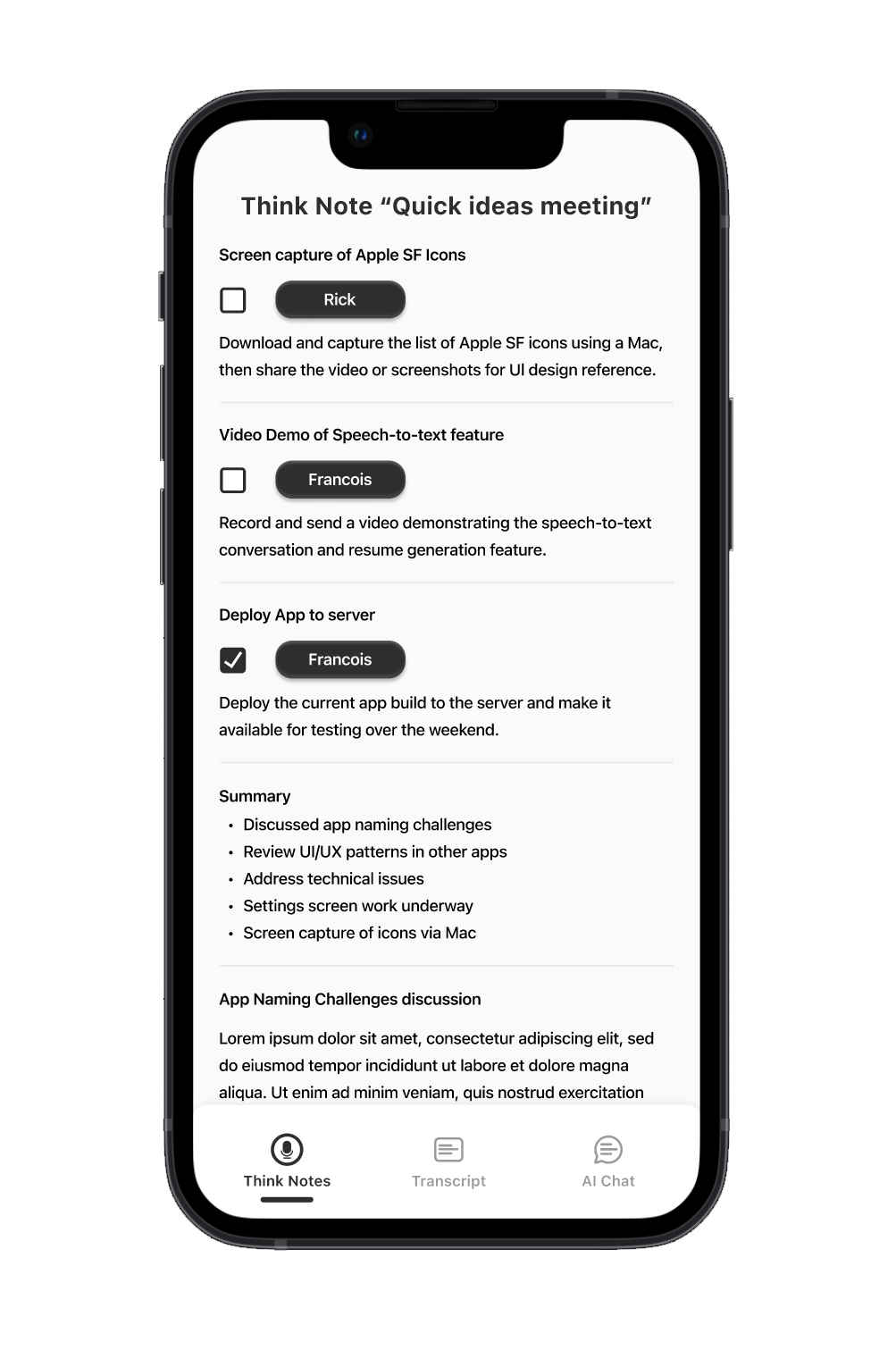
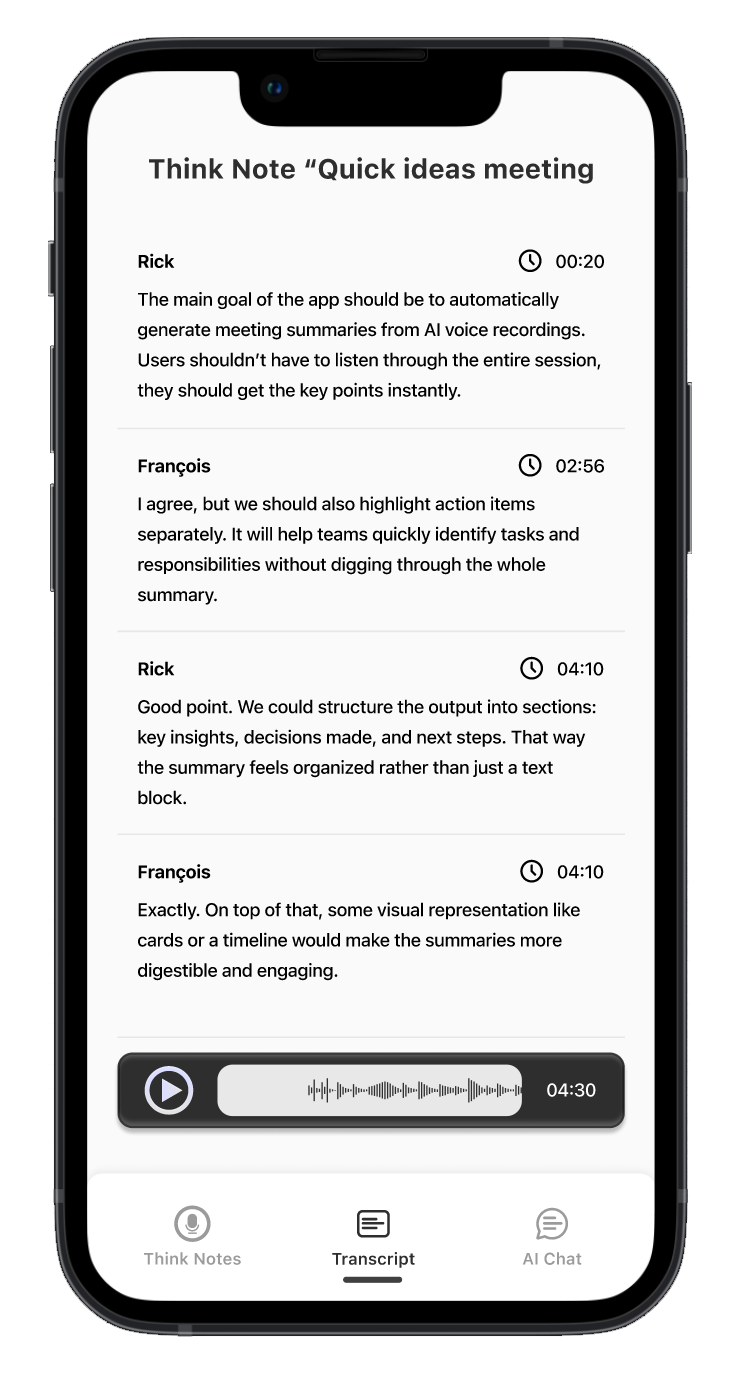
The app’s core navigation places Think Notes (AI summaries) as the primary surface, with transcripts and AI chat available as secondary views.
This structure reflects a deliberate shift away from transcript-heavy tools, positioning summaries, action points, and decisions as the main value users seek after meetings.
Human in the loop action items
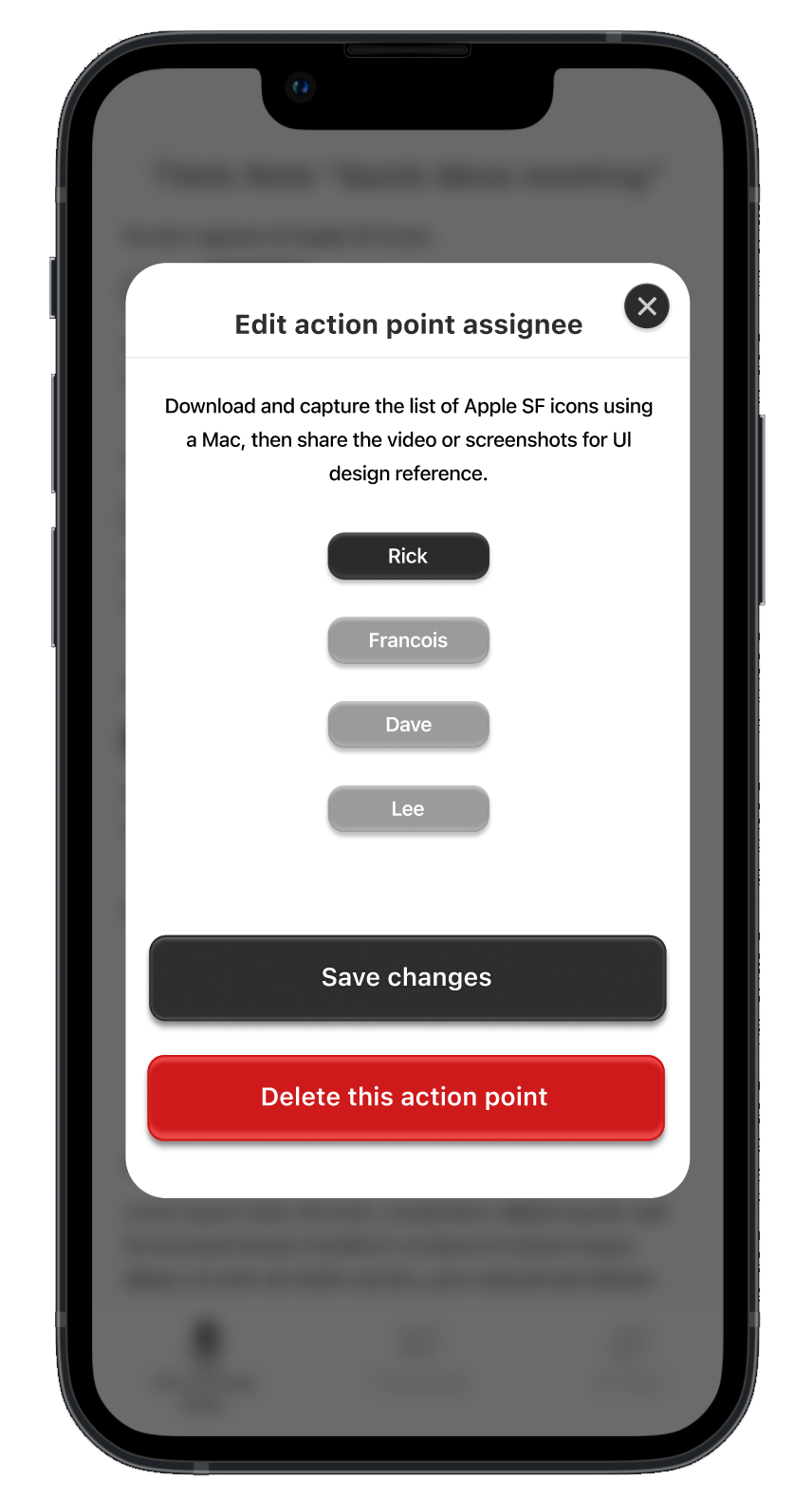
AI-generated action points are fully editable and assignable to individuals.
Users can change ownership, refine descriptions, or delete items entirely.
This design reinforces trust by ensuring that AI supports decision-making without removing human accountability or control.

1
Context-aware AI chat
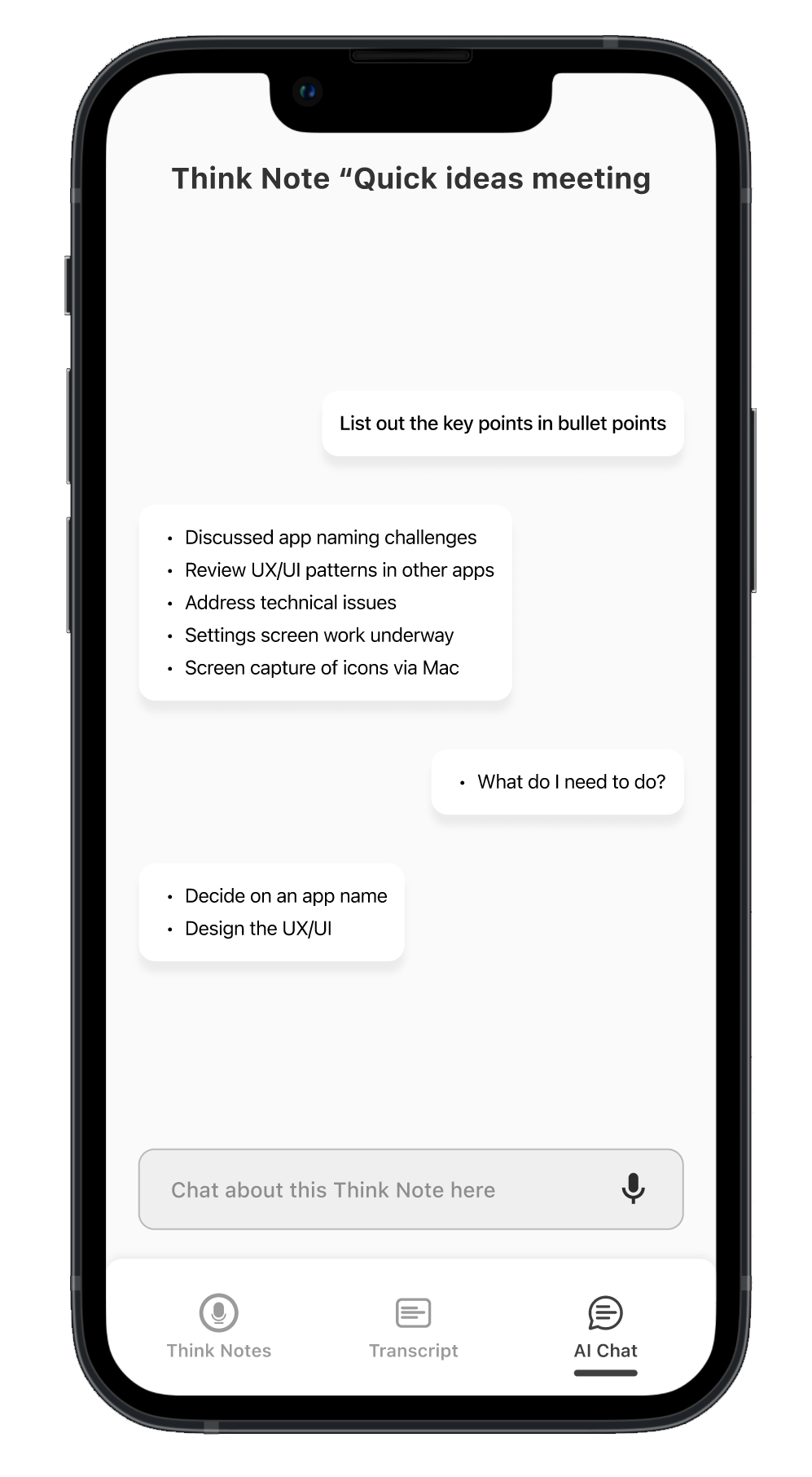
The AI chat feature is scoped to the specific meeting context rather than acting as a general-purpose chatbot.
Users can ask natural questions such as:
- “What do I need to do?”
- “What decisions were made?”
This supports clarification and follow-up without requiring users to scan entire transcripts.
2
Trust-first calendar integration
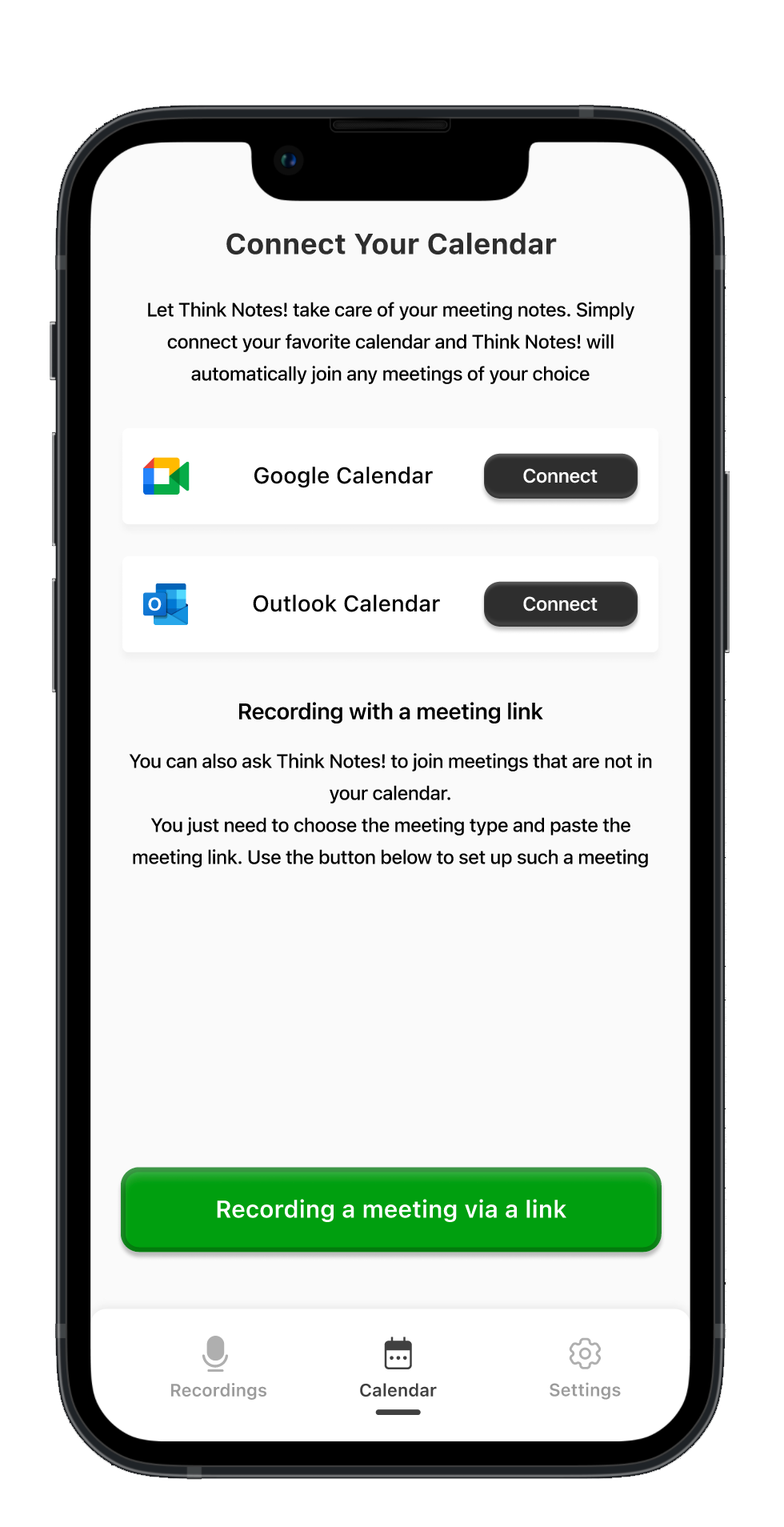
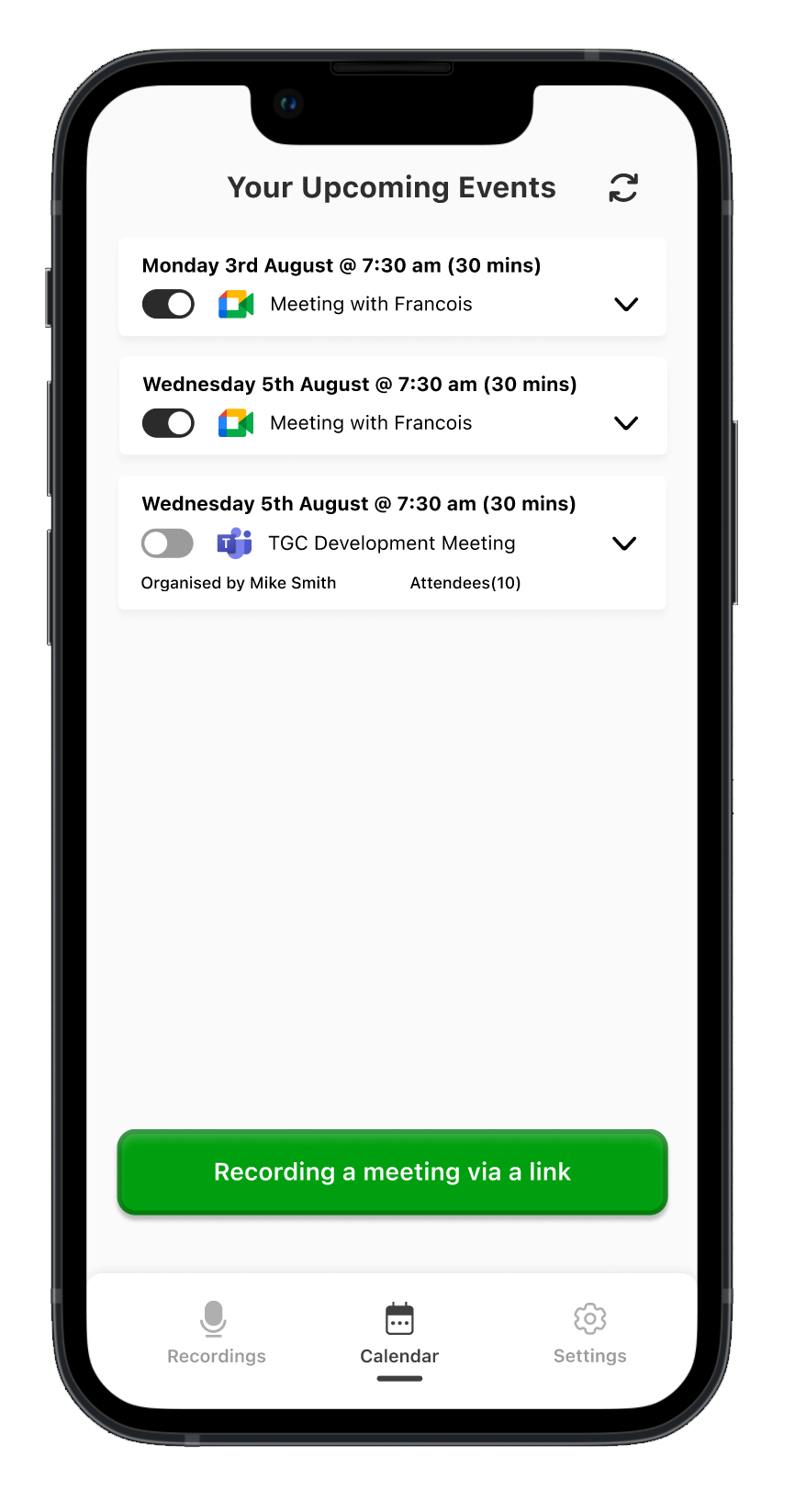
Calendar integration was designed with privacy and control as top priorities.
Instead of automatically joining or recording all meetings, Think Notes allows users to opt in at the individual event level. Each meeting displays contextual details such as organiser and attendee count to support informed decisions.
This approach reduces privacy anxiety and avoids over-automation.
3
Asynchronous processing experience
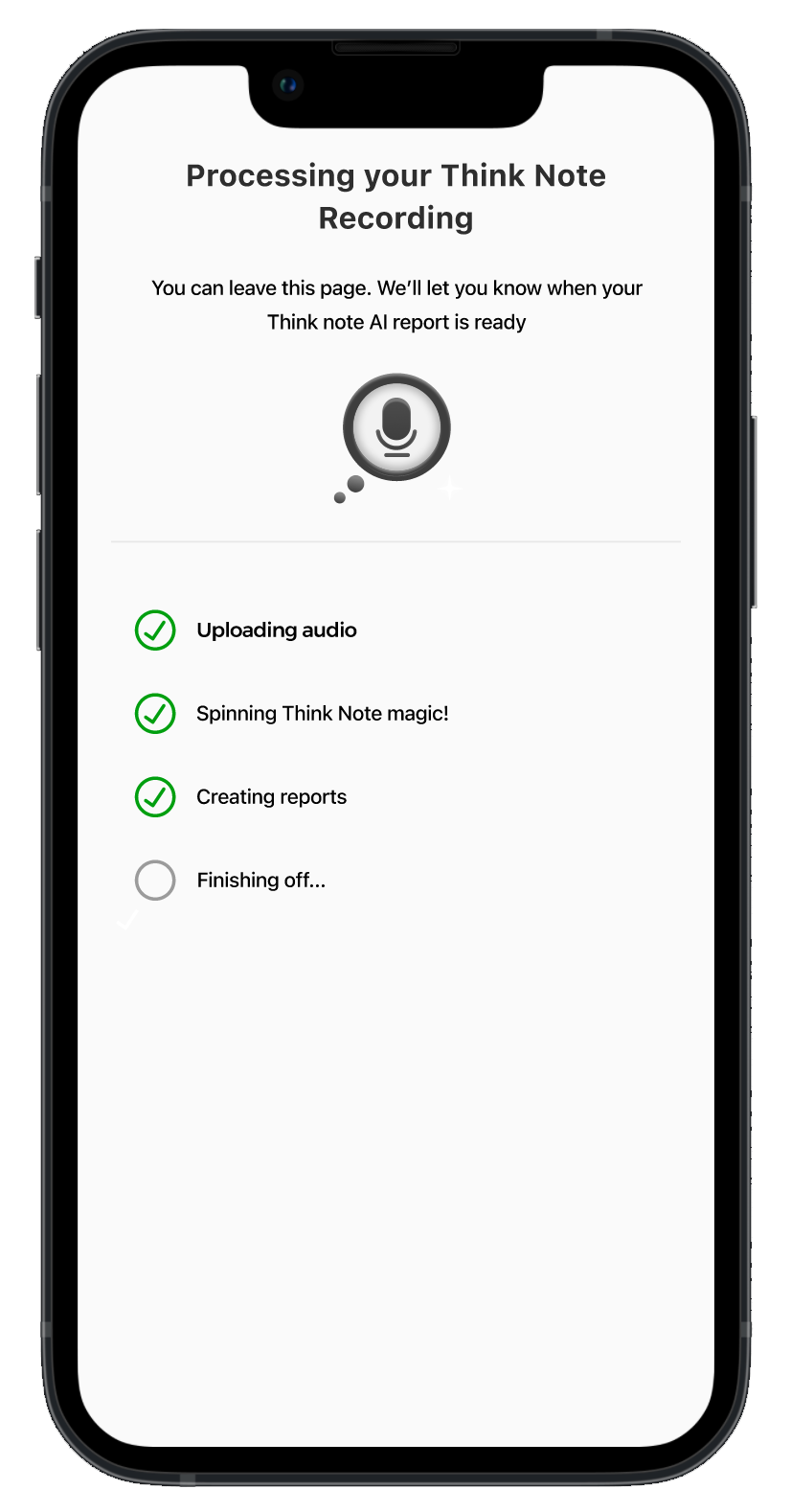
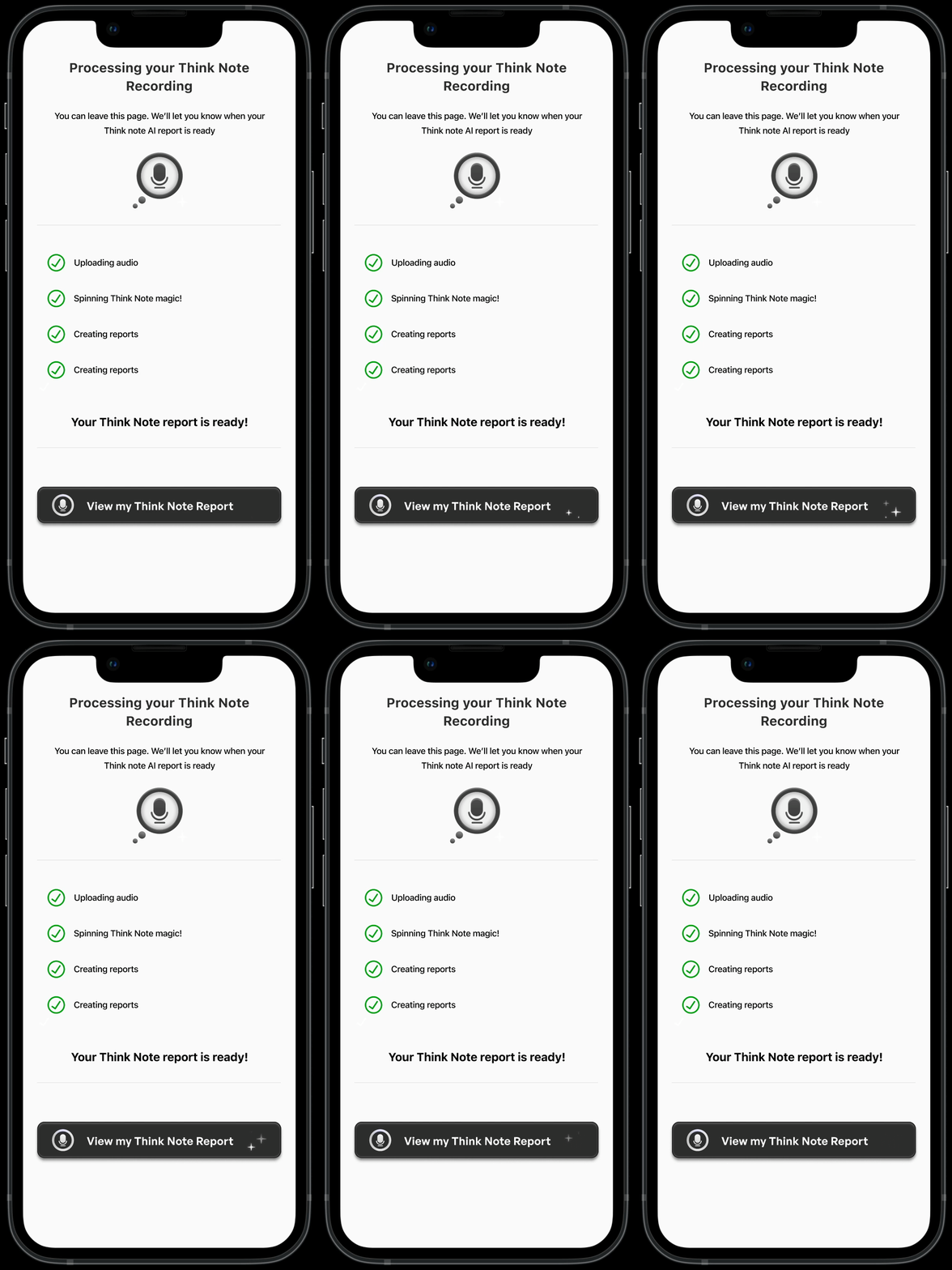
After a recording ends, users are explicitly told they can leave the screen while AI processing continues in the background.
Clear progress indicators communicate system status and reduce uncertainty, reinforcing the idea that AI is working forthe user, not demanding attention.
4
Organisation & scalability
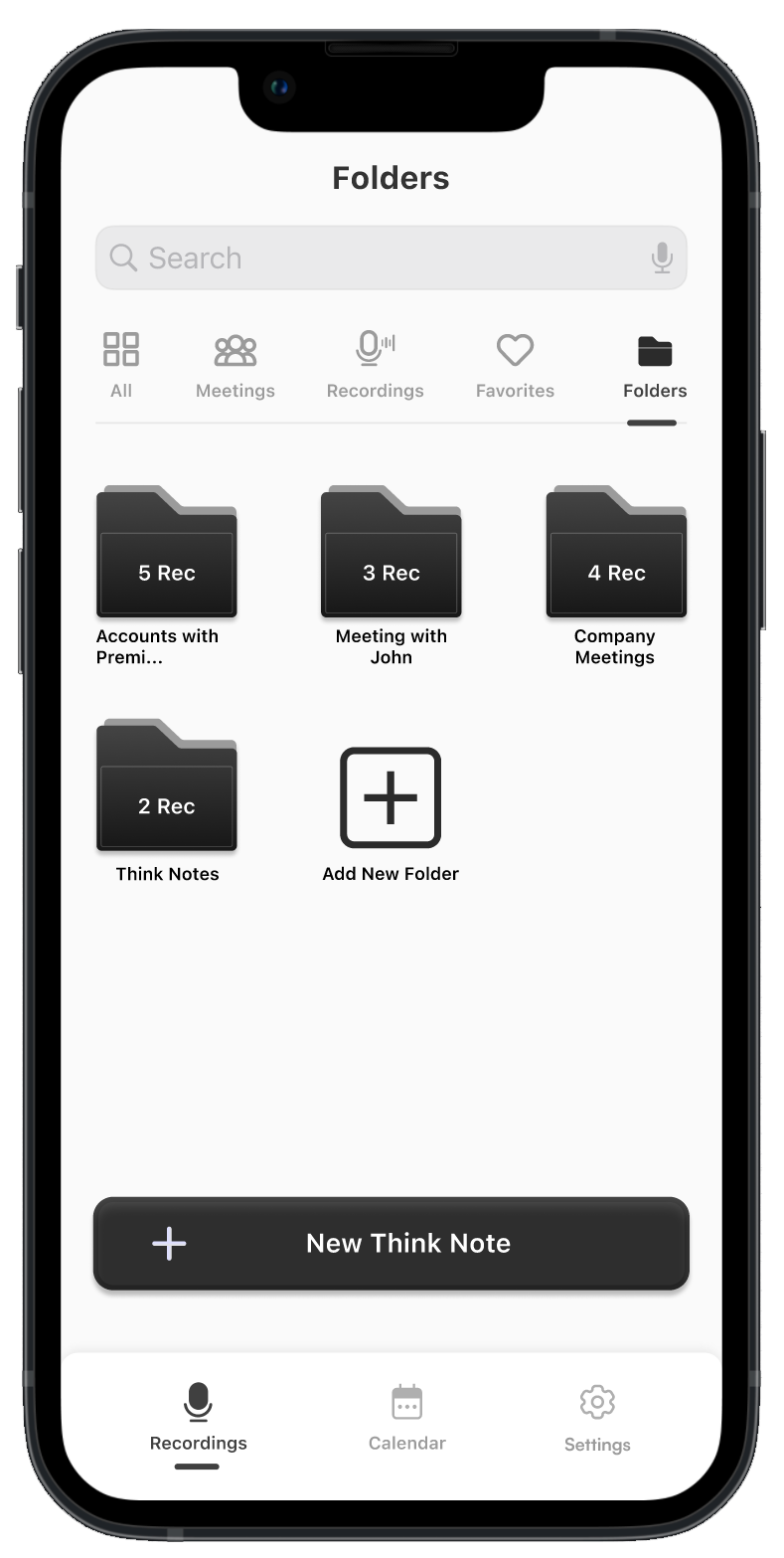
Folders and favourites were introduced early to support long-term usage and growing libraries of recordings.
This reflects an expectation that Think Notes would be used repeatedly over time, rather than as a one-off meeting tool.
5
Flexible sharing & outputs
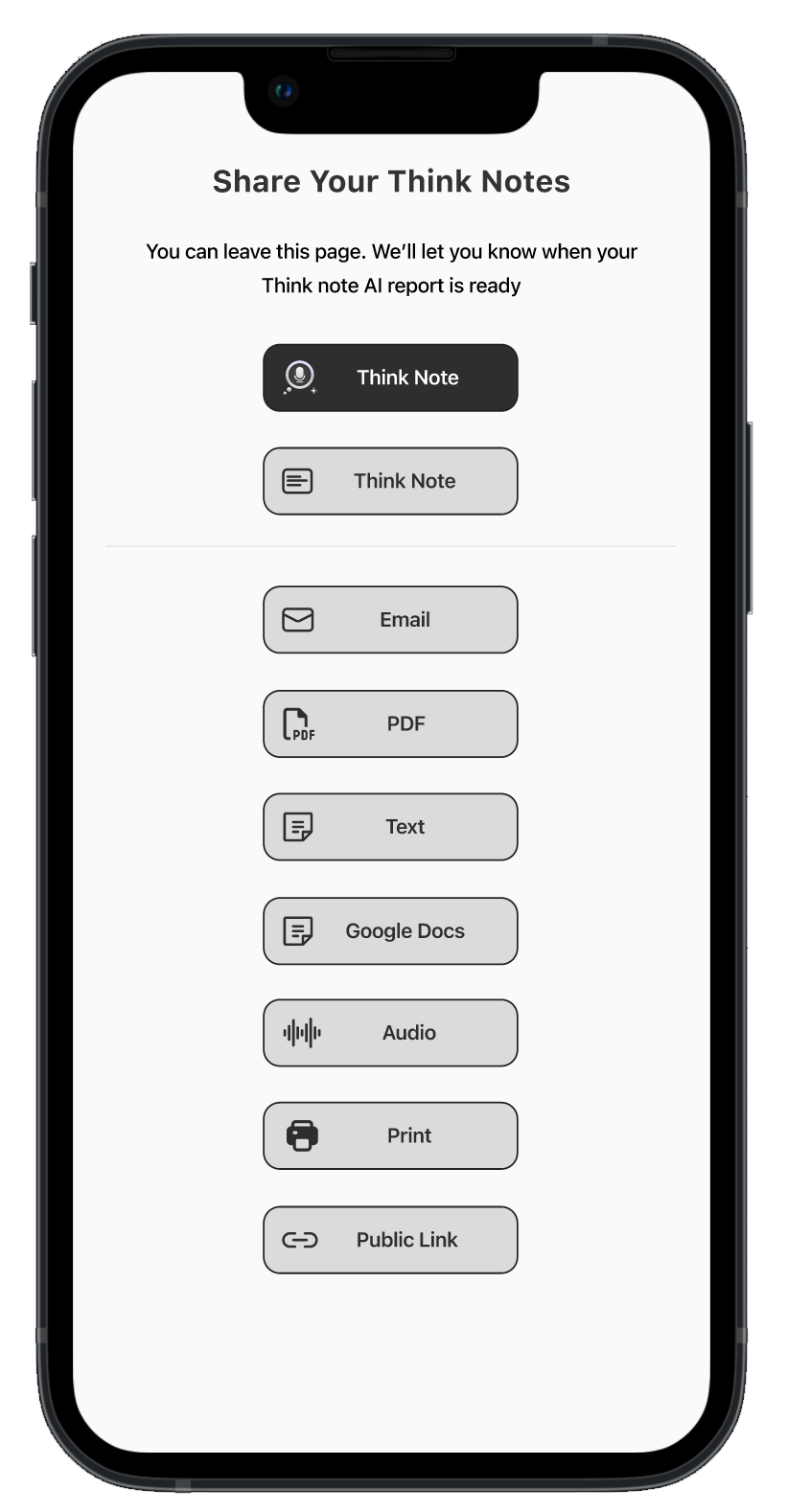
Think Notes supports multiple export formats, including summaries, transcripts, PDFs, audio, public links, and third-party tools.
Different outputs are designed to meet the needs of different stakeholders, recognising that not all meeting participants require the same level of detail.
In addition to interface design, I created the Think Notes app logo and visual identity.
The branding aims to balance:
AI capability
Thoughtfulness and clarity
Calm, neutral aesthetics that build trust
This visual tone supports the product’s role as a quiet assistant rather than an intrusive presence.

Reflection & Next Steps
What worked well
- Designing a coherent AI experience under tight constraints
- Establishing a clear summary-first product position
- Balancing automation with user control and trust
What I would improve next
- Conduct post-MVP user interviews and usability testing
- Validate summary quality and trust perception
- Explore onboarding improvements for AI chat discoverability
- Refine folder and organisation patterns based on real usage
Final note
Think Notes demonstrates my ability to design AI-powered products under real-world constraints, making intentional trade-offs, applying competitive insights, and prioritising clarity, trust, and usability over novelty.
Back to Home


Ugur
Gokus
Home
Think Notes
Designing a trust-first AI meeting notes experience under real-world constraints

Project Overview
Think Notes is an AI-powered meeting notes application designed to help users capture conversations and automatically generate structured summaries, action items, and shareable outputs after meetings.
Rather than focusing on real-time transcription or complex dashboards, the product prioritises clarity, control, and post-meeting usefulness, allowing users to focus on the conversation itself while AI works quietly in the background.
Platform & Project type (2025)
- Mobile-first (iOS & Android)
- MVP / speed to market product
My Role
- Designed the core user flows and mobile interfaces
- Competitor Analysis
- Defined interaction patterns for AI-generated summaries and action items
- Designed the Think Notes app logo and visual identity
⏰ Duration : 4 Months

Context & Constraints
Think Notes was developed with a strong speed-to-market goal.Due to limited budget and a tight delivery timeline, the project did not include primary user research (such as interviews or usability testing) during the initial phase.
As the UI/UX designer, I took ownership of the research phase by conducting an independent competitive analysis. I reviewed and analysed several existing AI-powered meeting and note-taking tools, focusing on how they approached:
- Meeting recording flows
- AI-generated summaries
- Action items and task ownership
- Calendar automation and privacy
- Cognitive load during and after meetings
This approach allowed design decisions to be grounded in real product patterns and known usability issues, while remaining realistic within the project’s constraints.
Primary user research was identified as a critical next step following the MVP release.
Problem Space
Through competitive analysis and product evaluation, several recurring problems became clear across existing AI meeting tools:
- Information overload after meetings
Users are often presented with long transcripts that require additional effort to extract meaning.
- Summaries treated as secondary outputs
In many tools, AI summaries feel like an add-on rather than the core product value.
- Lack of ownership in action items
In many tools, AI summaries feel like an add-on rather than the core product value.
- Loss of user control through aggressive automation
Automatic recording and calendar integrations frequently create privacy and trust concerns.
- Cognitive overload during meetings
Real-time transcription and AI interactions distract users from participating fully in conversations.
Design Principles
To address these problems within the given constraints, the following design principles guided the work:
1-Summary first, transcript second
AI summaries should be the primary output, not raw transcripts.
2-Asynchronous by default
The product should not require attention during meetings.
3-Human in the loop AI
Users must be able to review, edit, and take control of AI-generated content.
4-Trust before automation
Automatic recording and calendar integrations frequently create privacy and trust concerns.
5-Minimal cognitive load
Interfaces should feel calm, predictable, and easy to scan.
Key Features & Design Decisions
Summary-first architecture
The app’s core navigation places Think Notes (AI summaries) as the primary surface, with transcripts and AI chat available as secondary views.
This structure reflects a deliberate shift away from transcript-heavy tools, positioning summaries, action points, and decisions as the main value users seek after meetings.
Human in the loop action items
AI-generated action points are fully editable and assignable to individuals.
Users can change ownership, refine descriptions, or delete items entirely.
This design reinforces trust by ensuring that AI supports decision-making without removing human accountability or control.

1
Context-aware AI chat
The AI chat feature is scoped to the specific meeting context rather than acting as a general-purpose chatbot.
Users can ask natural questions such as:
- “What do I need to do?”
- “What decisions were made?”
This supports clarification and follow-up without requiring users to scan entire transcripts.
2
Trust-first calendar integration
Calendar integration was designed with privacy and control as top priorities.
Instead of automatically joining or recording all meetings, Think Notes allows users to opt in at the individual event level. Each meeting displays contextual details such as organiser and attendee count to support informed decisions.
This approach reduces privacy anxiety and avoids over-automation.
3
Asynchronous processing experience
After a recording ends, users are explicitly told they can leave the screen while AI processing continues in the background.
Clear progress indicators communicate system status and reduce uncertainty, reinforcing the idea that AI is working forthe user, not demanding attention.
4
Organisation & scalability
Folders and favourites were introduced early to support long-term usage and growing libraries of recordings.
This reflects an expectation that Think Notes would be used repeatedly over time, rather than as a one-off meeting tool.
5
Flexible sharing & outputs
Think Notes supports multiple export formats, including summaries, transcripts, PDFs, audio, public links, and third-party tools.
Different outputs are designed to meet the needs of different stakeholders, recognising that not all meeting participants require the same level of detail.
In addition to interface design, I created the Think Notes app logo and visual identity.
The branding aims to balance:
AI capability
Thoughtfulness and clarity
Calm, neutral aesthetics that build trust
This visual tone supports the product’s role as a quiet assistant rather than an intrusive presence.
Reflection & Next Steps
What worked well
- Designing a coherent AI experience under tight constraints
- Establishing a clear summary-first product position
- Balancing automation with user control and trust
What I would improve next
- Conduct post-MVP user interviews and usability testing
- Validate summary quality and trust perception
- Explore onboarding improvements for AI chat discoverability
- Refine folder and organisation patterns based on real usage
Final note
Think Notes demonstrates my ability to design AI-powered products under real-world constraints, making intentional trade-offs, applying competitive insights, and prioritising clarity, trust, and usability over novelty.
Back to Home

Ugur
Gokus
Home
Think Notes
Designing a trust-first AI meeting notes experience under real-world constraints

Project Overview
Think Notes is an AI-powered meeting notes application designed to help users capture conversations and automatically generate structured summaries, action items, and shareable outputs after meetings.
Rather than focusing on real-time transcription or complex dashboards, the product prioritises clarity, control, and post-meeting usefulness, allowing users to focus on the conversation itself while AI works quietly in the background.
Platform & Project type (2025)
- Mobile-first (iOS & Android)
- MVP / speed to market product
My Role
- Designed the core user flows and mobile interfaces
- Competitor Analysis
- Defined interaction patterns for AI-generated summaries and action items
- Designing the interface of the Think Notes app and creating a design system
⏰ Duration : 5 Months

Context & Constraints
Think Notes was developed with a strong speed-to-market goal.Due to limited budget and a tight delivery timeline, the project did not include primary user research (such as interviews or usability testing) during the initial phase.
As the UI/UX designer, I took ownership of the research phase by conducting an independent competitive analysis. I reviewed and analysed several existing AI-powered meeting and note-taking tools, focusing on how they approached:
- Meeting recording flows
- AI-generated summaries
- Action items and task ownership
- Calendar automation and privacy
- Cognitive load during and after meetings
This approach allowed design decisions to be grounded in real product patterns and known usability issues, while remaining realistic within the project’s constraints.
Primary user research was identified as a critical next step following the MVP release.
Problem Space
Through competitive analysis and product evaluation, several recurring problems became clear across existing AI meeting tools:
- Information overload after meetings
Users are often presented with long transcripts that require additional effort to extract meaning.
- Summaries treated as secondary outputs
In many tools, AI summaries feel like an add-on rather than the core product value.
- Lack of ownership in action items
In many tools, AI summaries feel like an add-on rather than the core product value.
- Loss of user control through aggressive automation
Automatic recording and calendar integrations frequently create privacy and trust concerns.
- Cognitive overload during meetings
Real-time transcription and AI interactions distract users from participating fully in conversations.

Design Principles
To address these problems within the given constraints, the following design principles guided the work:
1-Summary first, transcript second
AI summaries should be the primary output, not raw transcripts.
2-Asynchronous by default
The product should not require attention during meetings.
3-Human in the loop AI
Users must be able to review, edit, and take control of AI-generated content.
4-Trust before automation
Automatic recording and calendar integrations frequently create privacy and trust concerns.
5-Minimal cognitive load
Interfaces should feel calm, predictable, and easy to scan.
Key Features & Design Decisions
Summary-first architecture
The app’s core navigation places Think Notes (AI summaries) as the primary surface, with transcripts and AI chat available as secondary views.
This structure reflects a deliberate shift away from transcript-heavy tools, positioning summaries, action points, and decisions as the main value users seek after meetings.
Human in the loop action items
AI-generated action points are fully editable and assignable to individuals.
Users can change ownership, refine descriptions, or delete items entirely.
This design reinforces trust by ensuring that AI supports decision-making without removing human accountability or control.

1
Context-aware AI chat
The AI chat feature is scoped to the specific meeting context rather than acting as a general-purpose chatbot.
Users can ask natural questions such as:
- “What do I need to do?”
- “What decisions were made?”
This supports clarification and follow-up without requiring users to scan entire transcripts.
2
Trust-first calendar integration
Calendar integration was designed with privacy and control as top priorities.
Instead of automatically joining or recording all meetings, Think Notes allows users to opt in at the individual event level. Each meeting displays contextual details such as organiser and attendee count to support informed decisions.
This approach reduces privacy anxiety and avoids over-automation.
3
Asynchronous processing experience
After a recording ends, users are explicitly told they can leave the screen while AI processing continues in the background.
Clear progress indicators communicate system status and reduce uncertainty, reinforcing the idea that AI is working forthe user, not demanding attention.
4
Organisation & scalability
Folders and favourites were introduced early to support long-term usage and growing libraries of recordings.
This reflects an expectation that Think Notes would be used repeatedly over time, rather than as a one-off meeting tool.
5
Flexible sharing & outputs
Think Notes supports multiple export formats, including summaries, transcripts, PDFs, audio, public links, and third-party tools.
Different outputs are designed to meet the needs of different stakeholders, recognising that not all meeting participants require the same level of detail.
In addition to interface design, I created the Think Notes app logo and visual identity.
The branding aims to balance:
AI capability
Thoughtfulness and clarity
Calm, neutral aesthetics that build trust
This visual tone supports the product’s role as a quiet assistant rather than an intrusive presence.
Reflection & Next Steps
What worked well
- Designing a coherent AI experience under tight constraints
- Establishing a clear summary-first product position
- Balancing automation with user control and trust
What I would improve next
- Conduct post-MVP user interviews and usability testing
- Validate summary quality and trust perception
- Explore onboarding improvements for AI chat discoverability
- Refine folder and organisation patterns based on real usage
Final note
Think Notes demonstrates my ability to design AI-powered products under real-world constraints, making intentional trade-offs, applying competitive insights, and prioritising clarity, trust, and usability over novelty.
Back to Home